
Overview
What if you had to build a production grade Kubernetes workflow on a machine that can barely spare a gigabyte of RAM per node?
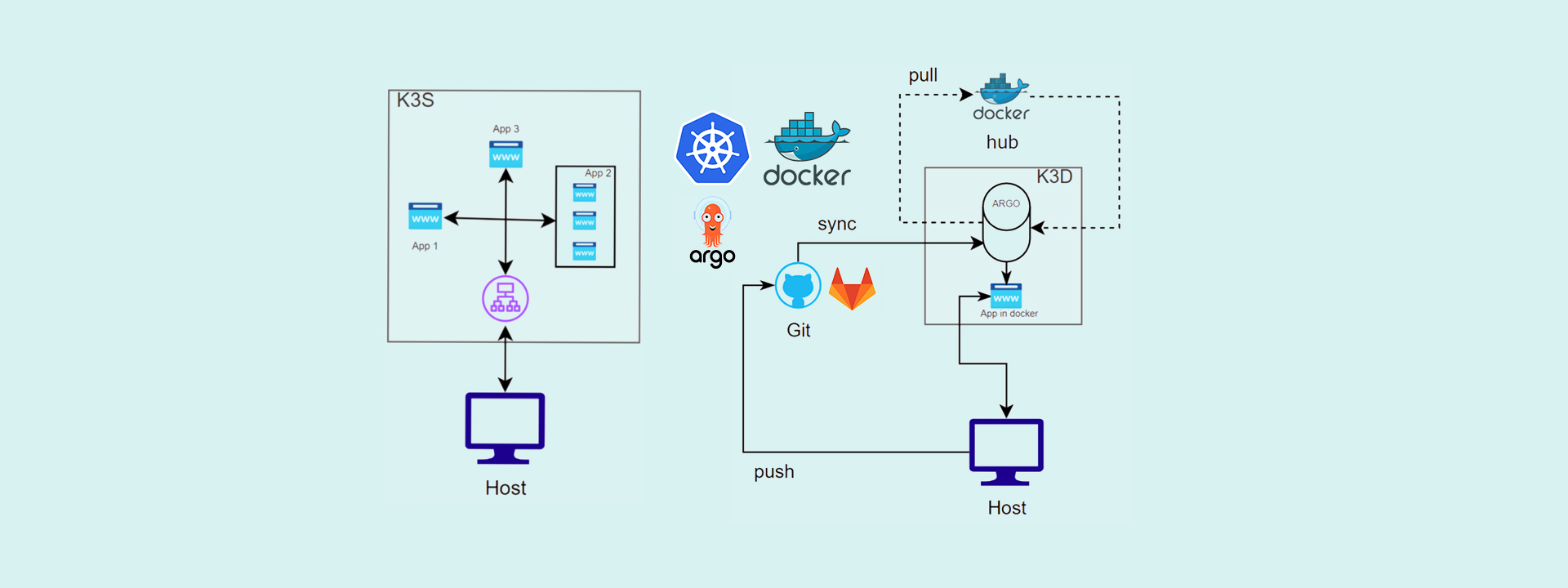
That's the challenge at the heart of Inception of Things, one of the toughest DevOps projects in the 42 Network curriculum. It doesn't just ask you to spin up a cluster and call it a day, it forces you to engineer a fully automated, lightweight infrastructure from the ground up, under punishing resource constraints and genuinely tricky networking requirements.
This article walks through our journey across the project's three phases:
-
Provisioning a functional, multi node K3s cluster with Vagrant, strictly capped at 1024MB of RAM per node, which meant aggressively stripping K3s down to the essentials just to keep nodes from crashing.
-
Automating the cluster join process end to end. SSH keys, tokens, and node registration, all without touching a keyboard mid process.
-
Deploying a multi application architecture to stress test internal routing, load balancing, and pod scheduling, followed by wiring up a true GitOps workflow with K3d and Argo CD, where the Git repo becomes the single source of truth for everything running in the cluster.
This isn't just a step by step tutorial. It's a breakdown of what actually went wrong (memory limits blown, automation that silently failed, race conditions in the join process) and how we solved each one to get the project validated.
The Foundation: Why Everything Starts With Vagrant
Before touching Kubernetes at all, we need a way to reliably spin up virtual machines. That's where Vagrant comes in.
What Is Vagrant?
Vagrant, built by HashiCorp, is a command line tool for building and managing virtual machine environments through a single, consistent workflow. Rather than manually installing an OS, wiring up networking, and installing software every time you need a fresh test environment, you describe the entire machine state in one declarative file. The Vagrantfile.
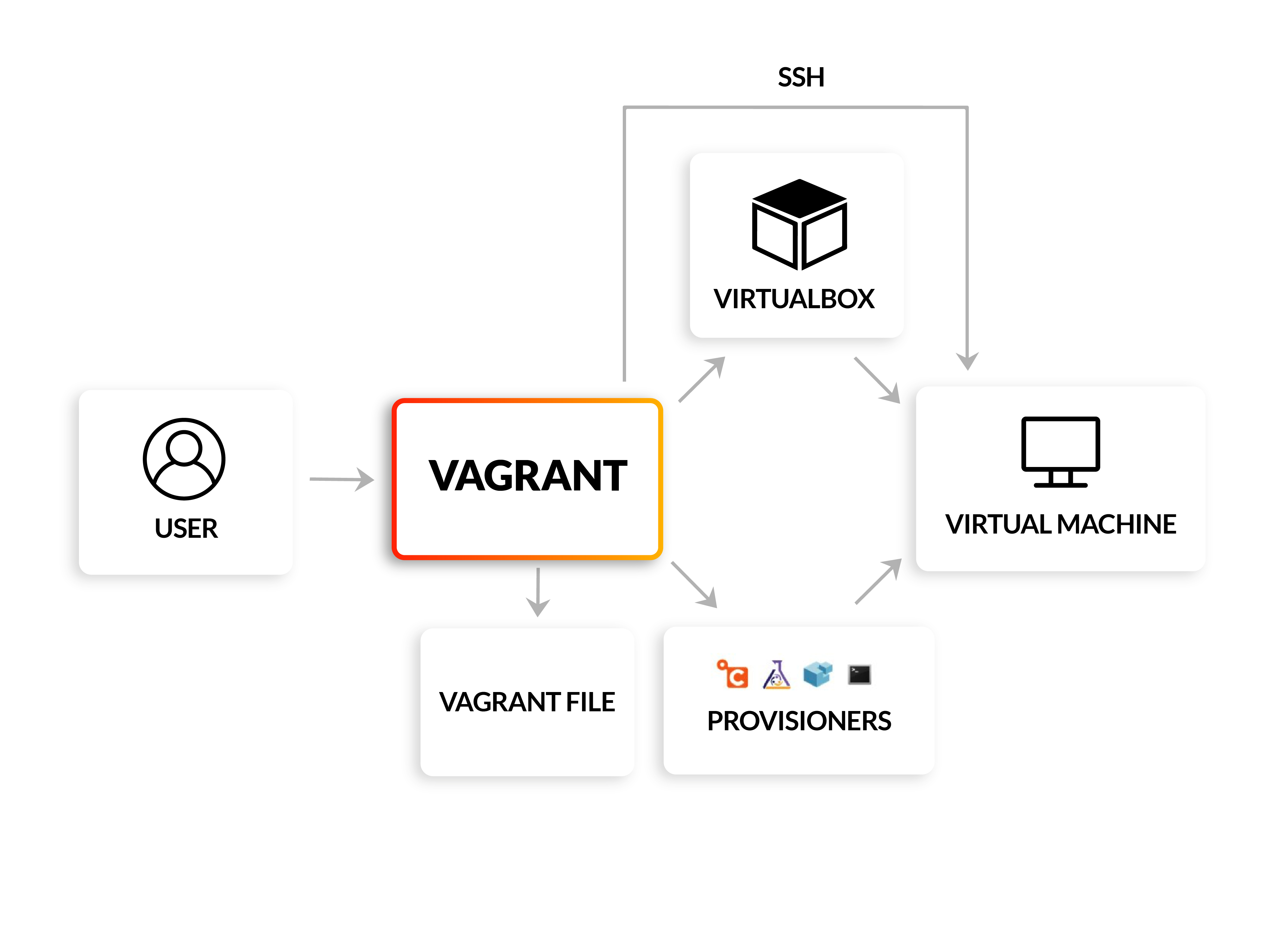
Think of it as infrastructure as code, but for your laptop. Vagrant sits on top of a hypervisor. VirtualBox in our case, and pulls down pre built OS images called boxes to spin machines up quickly and consistently.
The problem Vagrant really solves is the classic "it works on my machine" nightmare. Every developer's local setup differs (OS versions, installed packages, stray configuration), and that variability breeds bugs that are maddening to reproduce. Vagrant kills that variability by making environments fully reproducible and disposable. Break a cluster node? Just vagrant destroy it and rebuild an identical one in minutes.
How This Project Leverages Vagrant
Spinning up bare VMs isn't the goal here. We need them to configure themselves into a working K3s cluster the moment they boot. Two Vagrant features make that possible: Provisioning and Shared Folders.
1. Provisioning: Automating the Setup
Provisioning means automatically installing and configuring software inside a VM right after it boots, with no manual SSH session and no typing commands by hand. You just describe what should happen inside the Vagrantfile.
Tools like Ansible or Chef are great for heavier configuration management, but for this project we kept it simple with shell scripts (.sh). These scripts handle:
- Installing K3s: pulling the exact version needed for the cluster.
- Resource management: passing install flags to disable memory hungry default services, which was non negotiable under the 1024MB RAM ceiling.
- Passwordless SSH: generating and configuring SSH keys so nodes can talk to each other without a password prompt.
- Kubectl configuration: setting up the
.kubedirectory so thevagrantuser can runkubectlimmediately, with no root access required.
Now every time a controller or worker node is created, it lands in the exact desired state automatically, every single time.
2. Shared Folders: The Communication Bridge
By default, a Vagrant VM is sealed off from your host machine's filesystem. Shared folders (or synced folders) punch a hole through that isolation, linking a directory on your host to a directory inside the VM, typically mounted at /vagrant.
In this project, shared folders weren't just for convenience. They became the backbone of cluster automation. Joining a worker node to the cluster requires a secure token and the right SSH key. Instead of copy pasting those by hand, here's the flow we built:
- The controller node, during provisioning, generates its K3s token and connection keys and writes them straight into the
/vagrantshared directory. - The worker node, spinning up shortly after, reads those exact credentials from the shared folder and uses them to join the cluster, with no human in the loop.
This one trick turned a normally fiddly, manual join process into something completely frictionless.
Kubernetes vs. K3s: Why Go Lightweight?
What Is Kubernetes?
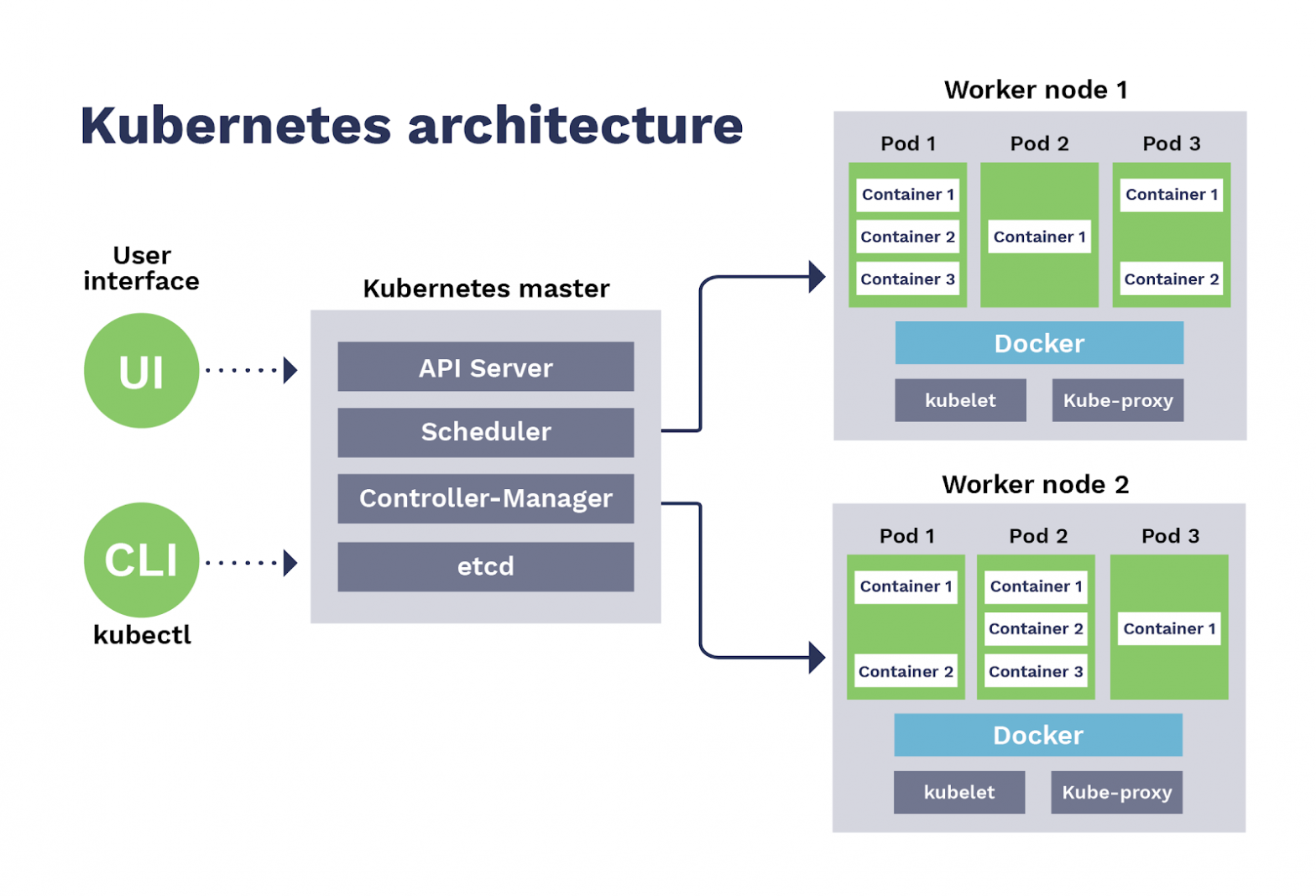
Kubernetes (often shortened to K8s) is an open source container orchestration platform originally built by Google. Once your app is packaged into containers with something like Docker, you still need a system to manage those containers at scale: deciding which machine each container runs on, restarting ones that crash, scaling up under load, handling inter container networking, and rolling out updates without downtime.
Kubernetes handles all of that. You declare your desired state, for example "I want three replicas of this app running, always," and Kubernetes continuously works to make reality match that declaration.
Core building blocks worth knowing:
- Pods: the smallest deployable unit, wrapping one or more containers.
- Deployments: manage replica sets of pods and handle rolling updates.
- Services: provide stable networking and load balancing across pods.
- etcd: the cluster's key value store, holding all cluster state.
- Control plane: the "brain" of the cluster (API server, scheduler, controller manager) making all the decisions.
Why K3s Instead?
K3s is a lightweight, fully CNCF compliant Kubernetes distribution built by Rancher (now part of SUSE). It ships as a single binary under 100MB and strips out a lot of the bulk found in full Kubernetes, while staying fully compatible with the standard Kubernetes API.
| Aspect | Kubernetes (full/K8s) | K3s |
|---|---|---|
| Binary size | Large, multiple components | Single binary, very small |
| Resource usage | Heavy, needs a robust cluster | Lightweight, runs on a Raspberry Pi |
| Default datastore | etcd (separate distributed database) | SQLite by default (etcd optional) |
| Extra components | Ships with many optional add ons | Strips legacy/alpha features, in tree cloud provider plugins, etc. |
| Setup complexity | Complex, often needs tools like kubeadm | One line install script |
| Best for | Large production clusters, cloud environments | Edge computing, IoT, local dev, CI pipelines, small production clusters |
Why teams reach for K3s:
- Simplicity: installs in seconds with a single script, versus the multi step dance of setting up full Kubernetes.
- Resource efficiency: ideal for CPU and memory constrained environments like edge devices, home labs, or small VPS instances.
- Faster iteration: spinning up a K3s cluster for local dev or CI/CD is dramatically quicker than a full K8s cluster.
- Still production capable: despite being lightweight, K3s is CNCF certified and plays perfectly with
kubectl, Helm charts, and the rest of the Kubernetes ecosystem. You're not trading away compatibility for simplicity.
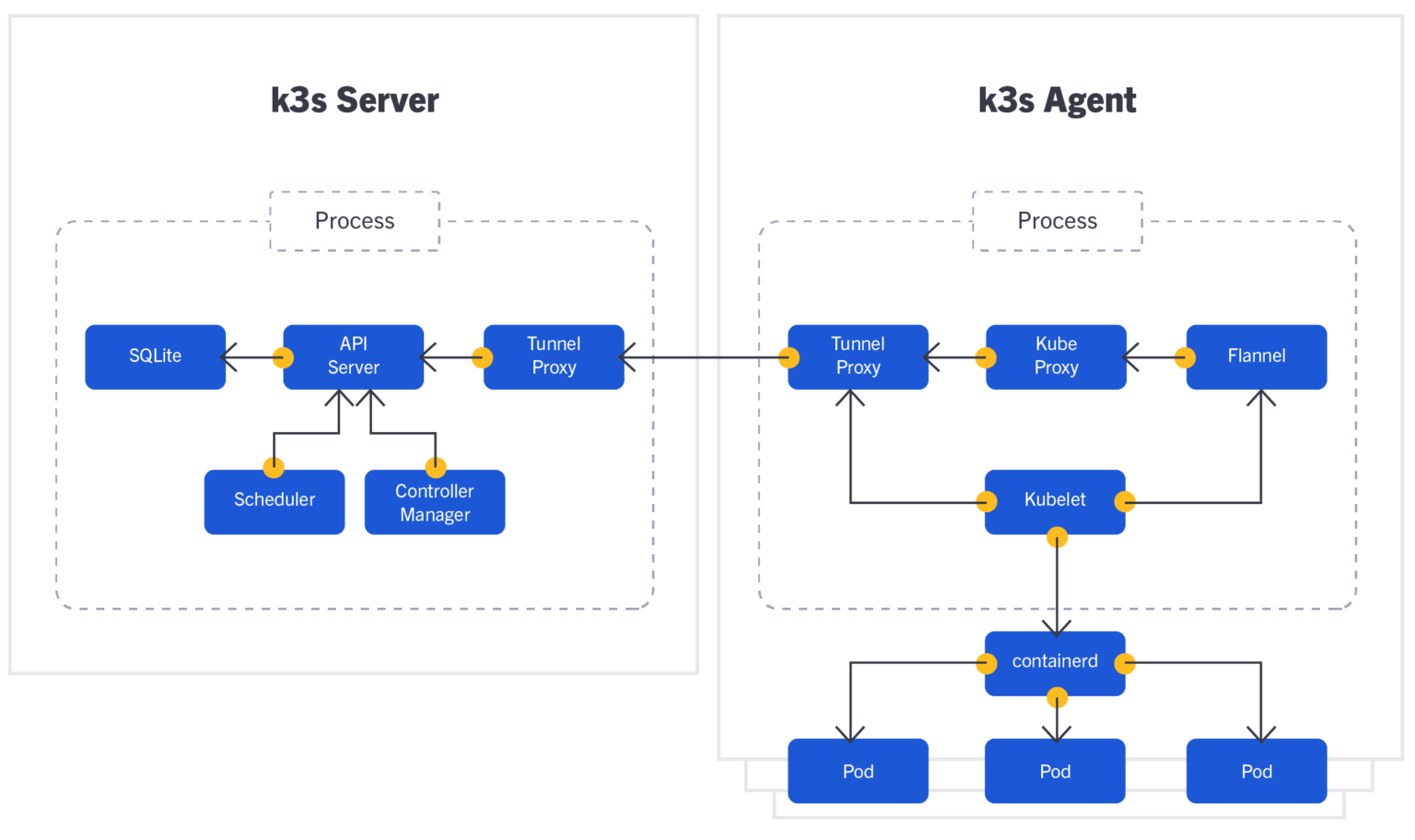
In short, Kubernetes is the industry standard heavyweight built for large scale production. K3s delivers that same orchestration power in a fraction of the footprint, a perfect fit for small teams, edge deployments, or, in our case, a resource starved local test lab.
Part 1: K3s and Vagrant
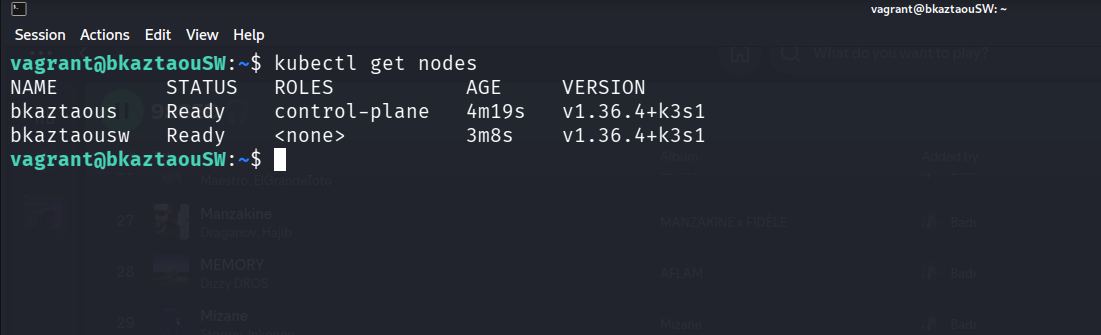
With Vagrant and K3s chosen as our foundation, it was time to write the actual code to provision the cluster. The setup requires one controller node and one worker node, both configured automatically upon creation.
The Vagrantfile: Defining the Rules
The Vagrantfile acts as the blueprint for our virtual machines. For this project, we used the debian/bookworm64 box.
We defined two distinct machines:
- The Controller (bkaztaouS): Assigned the static IP
192.168.56.110. - The Worker (bkaztaouSW): Assigned the static IP
192.168.56.111.
To strictly adhere to the project constraints, we explicitly configured the VirtualBox provider to limit both machines to exactly 1024 MB of RAM and 1 CPU. Finally, we instructed Vagrant to run a specific shell script for each machine (scripts/controller.sh and scripts/worker.sh) to handle the heavy lifting.
Vagrant.configure("2") do |config|
    config.vm.box = "debian/bookworm64"

    config.vm.define "bkaztaouS" do |c|
        c.vm.hostname = "bkaztaouS"
        c.vm.network "private_network", ip: "192.168.56.110"
        c.vm.provider "virtualbox" do |vb|
            vb.memory = "1024"
            vb.cpus = 1
            vb.name = "bkaztaouS"
        end
        c.vm.provision "shell", path: "scripts/controller.sh"
    end

    config.vm.define "bkaztaouSW" do |w|
        w.vm.hostname = "bkaztaouSW"
        w.vm.network "private_network", ip: "192.168.56.111"
        w.vm.provider "virtualbox" do |vb|
            vb.memory = "1024"
            vb.cpus = 1
            vb.name = "bkaztaouSW"
        end
        w.vm.provision "shell", path: "scripts/worker.sh"
    end
end
The Controller Script: Bootstrapping and Sharing Secrets
The controller script has two main jobs:
- installing a stripped down K3s server
- preparing the credentials so the worker node can join seamlessly without human intervention.
First, the script sets up a directory at /vagrant/shared. Since this folder is synced between the host and the VMs, it serves as the perfect secure drop box. The script uses openssl to generate a random 32-byte hex token (k3s_token). It then generates RSA SSH keys for both the controller and the agent, dumping the public keys into an authorized_keys file inside that shared folder. It also modifies the .ssh/config to set StrictHostKeyChecking no, completely automating the SSH trust process.
Next comes the K3s installation. Installing standard K3s would still be risky on just 1GB of RAM. To prevent out of memory crashes, we passed aggressive flags to the installation script to disable everything we didn't strictly need: --disable=traefik, --disable=servicelb, --disable=metrics-server, and several others. We also bound the node IP and configured the flannel-iface=eth1 so the internal cluster networking routed correctly across the Vagrant private network. Finally, it drops a modified kubeconfig into the shared folder.
#!/bin/sh
set -e

export DEBIAN_FRONTEND=noninteractive

apt-get update && apt-get install -y curl openssl openssh-client

CONTROLLER_IP="192.168.56.110"
SHARED="/vagrant/shared"
HOME_DIR=$(getent passwd vagrant | cut -d: -f6)
SSH_DIR="$HOME_DIR/.ssh"

mkdir -p "$SHARED"
openssl rand -hex 32 > "$SHARED/k3s_token"

K3S_TOKEN=$(cat "$SHARED/k3s_token")

ssh-keygen -t rsa -b 4096 -N "" -f "$SHARED/controller_id_rsa"
ssh-keygen -t rsa -b 4096 -N "" -f "$SHARED/agent_id_rsa"

cat "$SHARED/controller_id_rsa.pub" "$SHARED/agent_id_rsa.pub" > "$SHARED/authorized_keys"

cp "$SHARED/controller_id_rsa" "$SSH_DIR/id_rsa"
cp "$SHARED/controller_id_rsa.pub" "$SSH_DIR/id_rsa.pub"

cat "$SHARED/authorized_keys" >> "$SSH_DIR/authorized_keys"

echo "StrictHostKeyChecking no" >> "$SSH_DIR/config"
echo "UserKnownHostsFile=/dev/null" >> "$SSH_DIR/config"

chmod 700 "$SSH_DIR"
chmod 600 "$SSH_DIR/id_rsa" "$SSH_DIR/authorized_keys" "$SSH_DIR/config"

chown -R vagrant:vagrant "$SSH_DIR"

curl -sfL https://get.k3s.io | K3S_TOKEN="$K3S_TOKEN" INSTALL_K3S_EXEC="server \
  --node-ip=$CONTROLLER_IP \
  --bind-address=$CONTROLLER_IP \
  --flannel-iface=eth1 \
  --flannel-backend=host-gw \
  --tls-san=$CONTROLLER_IP \
  --disable=traefik \
  --disable=servicelb \
  --disable=metrics-server \
  --disable=local-storage \
  --disable-helm-controller \
  --disable-network-policy \
  --disable-cloud-controller" sh -

mkdir -p "$HOME_DIR/.kube"
sed "s/127.0.0.1/$CONTROLLER_IP/" /etc/rancher/k3s/k3s.yaml > "$HOME_DIR/.kube/config"
chown -R vagrant:vagrant "$HOME_DIR/.kube"
cp "$HOME_DIR/.kube/config" "$SHARED/kubeconfig"

echo "Controller ready."
The Worker Script: Waiting and Joining
The worker script (worker.sh) is all about timing. When the worker VM boots, it needs to grab the secrets left by the controller and join the cluster.
First, it reaches into the /vagrant/shared folder and copies the agent_id_rsa keys and the authorized_keys into its own ~/.ssh directory.
However, we face a race condition, the worker might boot up before the controller has finished installing K3s. To solve this, we wrote a simple until loop using curl that constantly checks the controller's API port (https://192.168.56.110:6443). The script literally pauses and waits until it gets a response.
Once the controller is up, the script reads the k3s_token from the shared folder and runs the K3s agent installation. It points to the controller's URL, passes the token, and configures its own networking to use eth1. Lastly, it copies the kubeconfig to the local user directory and cleans up the shared folder by deleting it.
#!/bin/sh
set -e

export DEBIAN_FRONTEND=noninteractive

apt-get update && apt-get install -y curl openssh-client

HOME_DIR=$(getent passwd vagrant | cut -d: -f6)
CONTROLLER_IP="192.168.56.110"
AGENT_IP="192.168.56.111"
SHARED="/vagrant/shared"
SSH_DIR="$HOME_DIR/.ssh"

cp "$SHARED/agent_id_rsa" "$SSH_DIR/id_rsa"
cp "$SHARED/agent_id_rsa.pub" "$SSH_DIR/id_rsa.pub"

cat "$SHARED/authorized_keys" >> "$SSH_DIR/authorized_keys"

echo "StrictHostKeyChecking no" >> "$SSH_DIR/config"
echo "UserKnownHostsFile=/dev/null" >> "$SSH_DIR/config"

chmod 700 "$SSH_DIR"
chmod 600 "$SSH_DIR/id_rsa" "$SSH_DIR/authorized_keys" "$SSH_DIR/config"
chown -R vagrant:vagrant "$SSH_DIR"

K3S_TOKEN=$(cat "$SHARED/k3s_token")

echo "Waiting for controller..."
until curl -sk -o /dev/null "https://$CONTROLLER_IP:6443"; do sleep 3; done

curl -sfL https://get.k3s.io | K3S_URL="https://$CONTROLLER_IP:6443" K3S_TOKEN="$K3S_TOKEN" INSTALL_K3S_EXEC="agent \
  --node-ip=$AGENT_IP \
  --flannel-iface=eth1" sh -

mkdir -p "$HOME_DIR/.kube"
cp "$SHARED/kubeconfig" "$HOME_DIR/.kube/config"
chown -R vagrant:vagrant "$HOME_DIR/.kube"

rm -rf "$SHARED"

echo "Worker joined the cluster."
Part 2: K3s and three simple applications
With the foundational K3s infrastructure running, the next step was to prove that it can actually serve and route traffic correctly. For this phase, we adjusted the environment slightly. Since the goal here is to focus on application deployment and Ingress routing rather than multi node cluster mechanics, we provisioned a single controller node with 2048MB of RAM.
Vagrant.configure("2") do |config|
    config.vm.box = "debian/bookworm64"

    config.vm.define "bkaztaouS" do |c|
        c.vm.hostname = "bkaztaouS"
        c.vm.network "private_network", ip: "192.168.56.110"
        c.vm.provider "virtualbox" do |vb|
            vb.memory = "2048"
            vb.cpus = 1
            vb.name = "bkaztaouS"
        end
        c.vm.provision "shell", path: "scripts/controller.sh"
    end
end
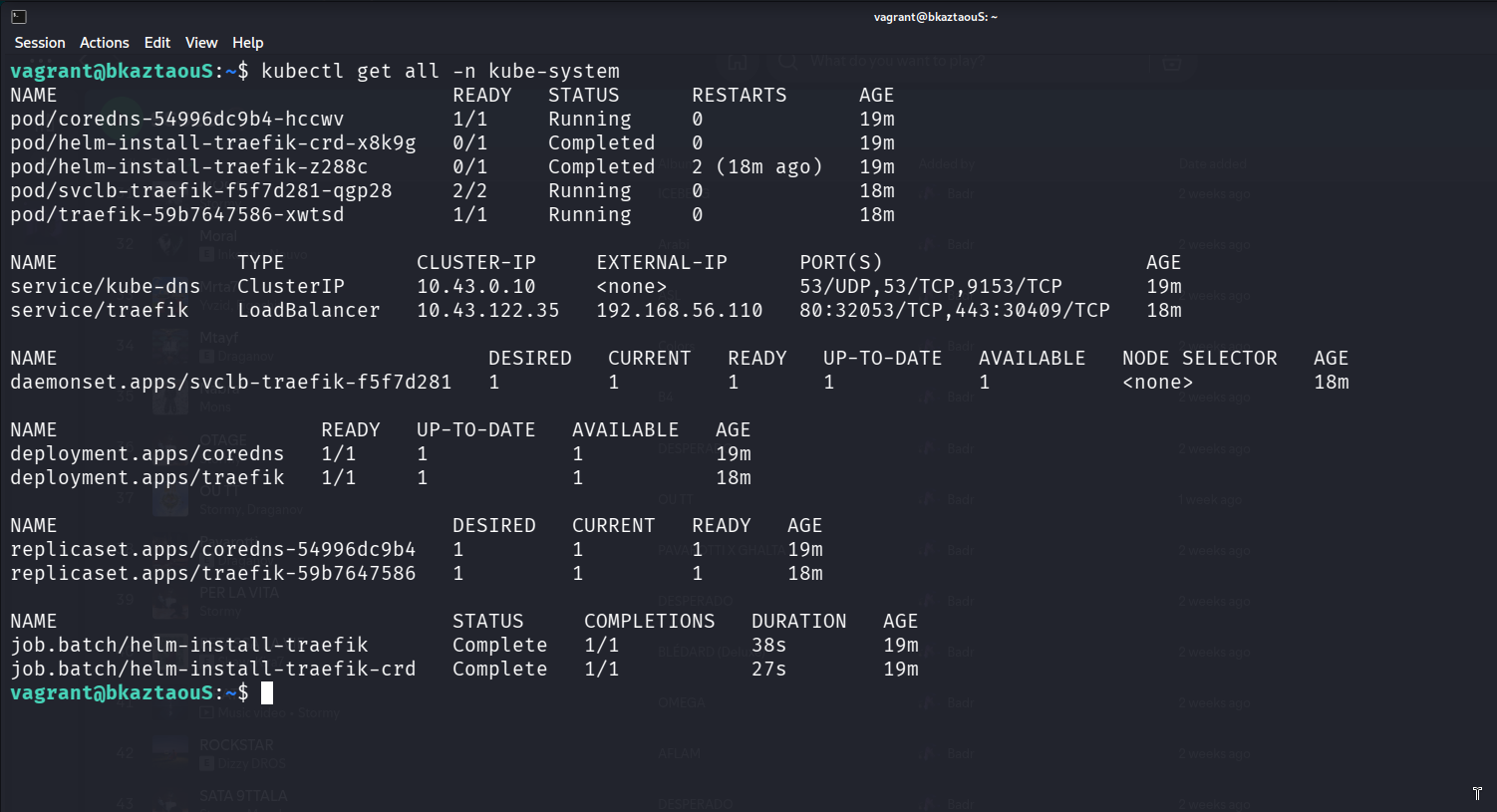
A crucial change was made in the controller.sh provisioning script. In Part 1, we disabled traefik to save memory. However, to route external HTTP traffic into our cluster effectively, we need an Ingress controller. K3s ships with Traefik by default, so we intentionally left it enabled for this phase.
#!/bin/sh

set -e

export DEBIAN_FRONTEND=noninteractive

apt-get update && apt-get install -y curl

HOME_DIR=$(getent passwd vagrant | cut -d: -f6)
CONTROLLER_IP="192.168.56.110"

curl -sfL https://get.k3s.io | INSTALL_K3S_EXEC="server \
  --node-ip=$CONTROLLER_IP \
  --bind-address=$CONTROLLER_IP \
  --flannel-iface=eth1 \
  --flannel-backend=host-gw \
  --tls-san=$CONTROLLER_IP \
  --disable=metrics-server \
  --disable=local-storage \
  --disable-cloud-controller" sh -

mkdir -p "$HOME_DIR/.kube"
sed "s/127.0.0.1/$CONTROLLER_IP/" /etc/rancher/k3s/k3s.yaml > "$HOME_DIR/.kube/config"
chown -R vagrant:vagrant "$HOME_DIR/.kube"

echo 'export KUBECONFIG="$HOME/.kube/config"' >> "$HOME_DIR/.bashrc"

echo "Controller ready."
The Application Stack
To validate the cluster, we deployed three distinct instances of the hello-kubernetes application. This simple application is perfect for testing because it displays the specific Pod handling the request, which makes verifying load balancing incredibly visual.
Here is how we structured the deployments:
- App1 (
app1.yaml): A standard deployment withreplicas: 1, passing the environment variableMESSAGE="Hello from App1!". - App2 (
app2.yaml): Scaled toreplicas: 3. This is explicitly designed to test K3s's internal load balancing. When we hit this app, we want to see the traffic distributed across three different Pods. - App3 (
app3.yaml): Another single replica deployment (replicas: 1), acting as our fallback or default application.
All three deployments are exposed internally within the cluster via standard Kubernetes Services on TCP port 80.
apiVersion: apps/v1
kind: Deployment
metadata:
  name: app1-deployment
  labels:
    app: app1
spec:
  replicas: 1
  selector:
    matchLabels:
      app: app1
  template:
    metadata:
      labels:
        app: app1
    spec:
      containers:
      - name: hello-kubernetes
        image: paulbouwer/hello-kubernetes:1.10
        ports:
        - containerPort: 8080
        env:
        - name: MESSAGE
          value: "Hello from App1!"
---
apiVersion: v1
kind: Service
metadata:
  name: app1-service
spec:
  selector:
    app: app1
  ports:
    - protocol: TCP
      port: 80
      targetPort: 8080
This is app1.yaml. But all three applications share the exact same base configuration. The only differences between the files are the application names, the injected environment messages, and the specific number of replicas needed to demonstrate load balancing.
Routing with Ingress
Exposing Services inside the cluster is only half the battle. To access them from the outside using clean domain names, we configured an Ingress resource (ingress.yaml).
Here is how the routing rules are defined:
- Traffic requesting the host
app1.comis directed toapp1-service. - Traffic requesting the host
app2.comis directed toapp2-service. - Any traffic that doesn't match a specific host acts as a catch all and falls back to
app3-service.
apiVersion: networking.k8s.io/v1
kind: Ingress
metadata:
  name: main-ingress
spec:
  rules:
  - host: app1.com
    http:
      paths:
      - path: /
        pathType: Prefix
        backend:
          service:
            name: app1-service
            port:
              number: 80
  - host: app2.com
    http:
      paths:
      - path: /
        pathType: Prefix
        backend:
          service:
            name: app2-service
            port:
              number: 80
  - http:
      paths:
      - path: /
        pathType: Prefix
        backend:
          service:
            name: app3-service
            port:
              number: 80
By mapping these hostnames in the local /etc/hosts file to our Vagrant VM's IP (192.168.56.110), we can simply open a browser, navigate to app2.com, and watch K3s and Traefik effortlessly route and load balance the requests across our deployed Pods.
Part 3: K3d and Argo CD
In the final phase of the Inception of Things project, the goal was to eliminate manual deployments entirely and embrace GitOps. In a GitOps workflow, the Git repository becomes the absolute single source of truth for your cluster's state. If a change isn't in Git, it doesn't exist in the cluster.
To achieve this, we shift our tooling slightly: instead of running K3s directly on the VM, we use K3d (K3s running inside Docker containers) for faster iteration, and Argo CD as our GitOps controller.
Rethinking the Infrastructure for GitOps
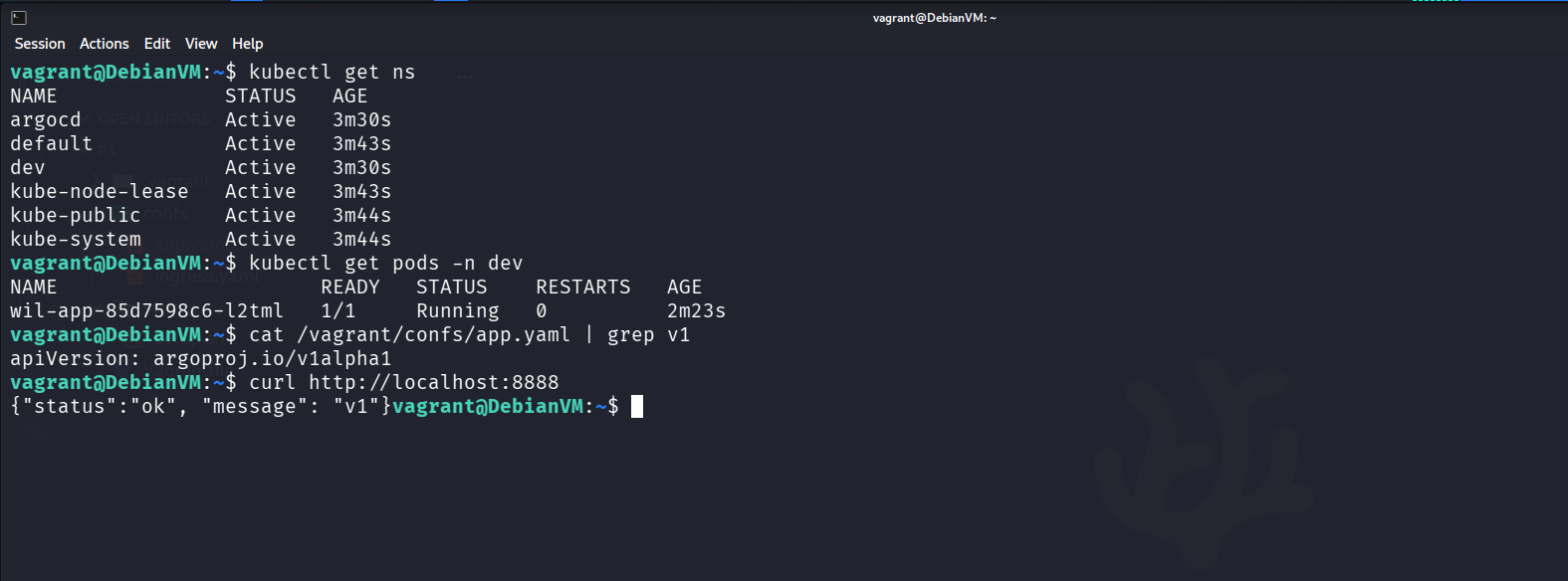
Because running Docker, K3d, and Argo CD simultaneously requires more resources, we updated the Vagrantfile to provision a single, more robust Debian VM with 4096MB of RAM and 2 CPUs. We also configured port forwarding (8888 and 8080) so we could access the Argo CD web UI directly from our host machine's browser.
Vagrant.configure("2") do |config|
    config.vm.box = "debian/bookworm64"

    config.vm.define "DebianVM" do |c|
        c.vm.hostname = "DebianVM"
        c.vm.network "forwarded_port", guest: 8888, host: 8888
        c.vm.network "forwarded_port", guest: 8080, host: 8080
        c.vm.provider "virtualbox" do |vb|
            vb.memory = "4096"
            vb.cpus = 2
            vb.name = "DebianVM"
        end
        c.vm.provision "shell", path: "scripts/setup.sh"
    end
end
The heavy lifting happens in the setup.sh script. Instead of manual installations, this script automates the entire GitOps bootstrap process:
- Docker & K3d Installation: It installs the Docker engine and then pulls K3d, which allows us to spin up a Kubernetes cluster inside Docker instantly.
- Cluster Creation: It runs
k3d cluster create dev-clusterwith specific port mappings (8888:8888@loadbalancer) to ensure traffic flows from the host, through Vagrant, into the K3d load balancer, and finally to our applications. - Argo CD Deployment: It installs Argo CD directly from its official raw manifests.
A critical detail in the setup script is dealing with Argo CD's default SSL/TLS behavior. By default, Argo CD enforces HTTPS, which can cause routing headaches with local Ingress setups. To bypass this for our local environment, we used a kubectl patch command to set server.insecure: "true" on the Argo CD ConfigMap, and then restarted the deployment.
#!/bin/sh

set -e
export DEBIAN_FRONTEND=noninteractive

apt-get update && apt-get install -y ca-certificates curl

install -m 0755 -d /etc/apt/keyrings
curl -fsSL https://download.docker.com/linux/debian/gpg -o /etc/apt/keyrings/docker.asc
chmod a+r /etc/apt/keyrings/docker.asc

echo "deb [arch=$(dpkg --print-architecture) signed-by=/etc/apt/keyrings/docker.asc] https://download.docker.com/linux/debian $(. /etc/os-release && echo "$VERSION_CODENAME") stable" | tee /etc/apt/sources.list.d/docker.list > /dev/null

apt-get update && apt-get install -y docker-ce docker-ce-cli containerd.io

curl -s https://raw.githubusercontent.com/k3d-io/k3d/main/install.sh | bash

curl -LO "https://dl.k8s.io/release/$(curl -L -s https://dl.k8s.io/release/stable.txt)/bin/linux/amd64/kubectl"
install -o root -g root -m 0755 kubectl /usr/local/bin/kubectl

k3d cluster create dev-cluster -p "8888:8888@loadbalancer" -p "8080:80@loadbalancer"

mkdir -p /home/vagrant/.kube
k3d kubeconfig get dev-cluster > /home/vagrant/.kube/config
chown -R vagrant:vagrant /home/vagrant/.kube

export KUBECONFIG=/home/vagrant/.kube/config
kubectl create namespace argocd
kubectl create namespace dev

kubectl apply -n argocd --server-side --force-conflicts -f https://raw.githubusercontent.com/argoproj/argo-cd/stable/manifests/install.yaml

sleep 10

kubectl patch configmap argocd-cmd-params-cm -n argocd -p '{"data": {"server.insecure": "true"}}'
kubectl rollout restart deploy argocd-server -n argocd

kubectl apply -f /vagrant/confs/ingress.yaml

echo "K3d cluster is up, ports are mapped, and namespaces are ready!"
Finally, an Ingress resource (ingress.yaml) is applied to expose the Argo CD server.
apiVersion: networking.k8s.io/v1
kind: Ingress
metadata:
  name: argocd-ingress
  namespace: argocd
spec:
  rules:
  - http:
      paths:
      - path: /
        pathType: Prefix
        backend:
          service:
            name: argocd-server
            port:
              number: 80
Accessing the Argo CD Dashboard
With the cluster up and the Ingress configured, the Argo CD UI is accessible via our forwarded port at http://localhost:8080. However, Argo CD securely generates a random initial admin password and stores it as a Kubernetes Secret.
To retrieve and decode this password for your first login (using the default username admin), you simply run:
kubectl -n argocd get secret argocd-initial-admin-secret -o jsonpath="{.data.password}" | base64 -d
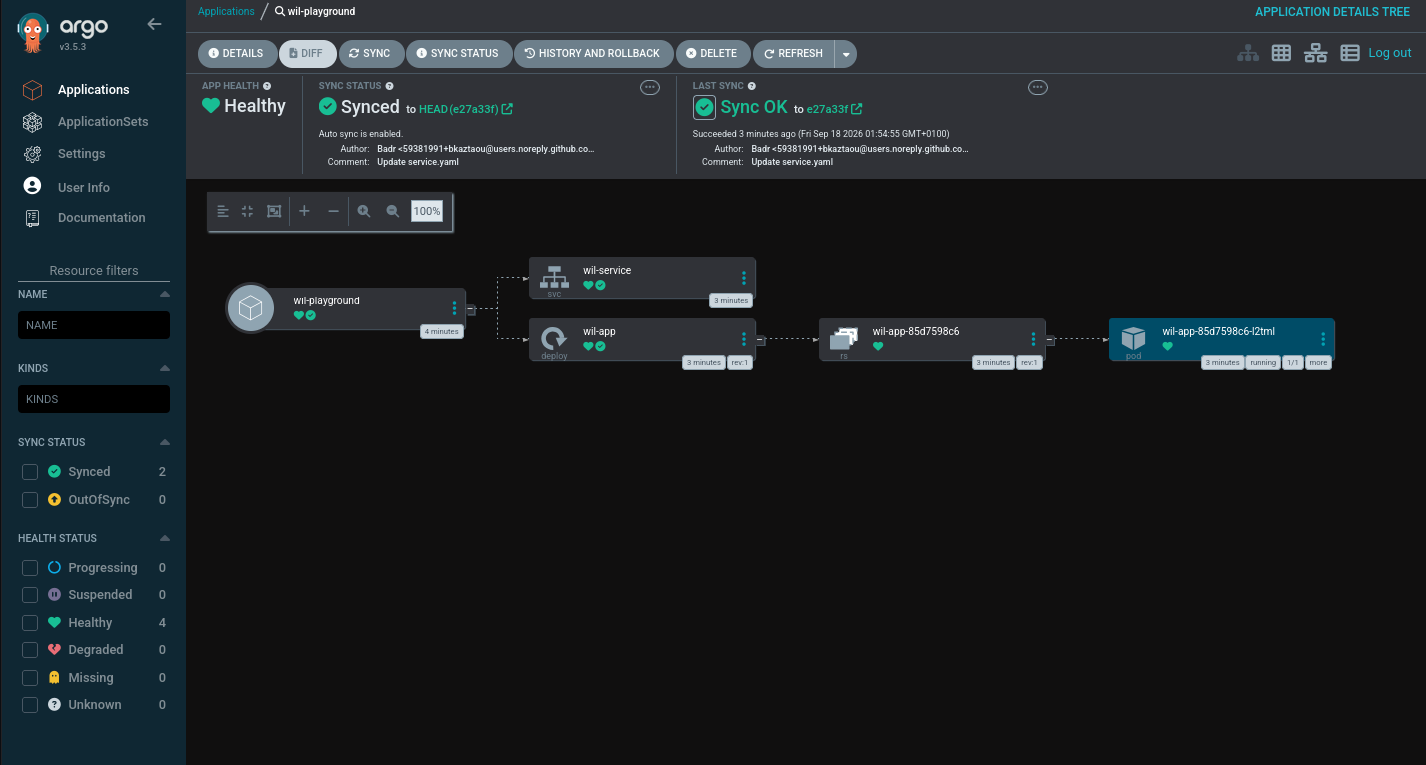
Once logged in, you can watch the GitOps synchronization happen in real time.
The GitOps Magic: The Application CRD
With Argo CD running, how do we actually tell it to deploy our code? We don't use kubectl apply on our app manifests anymore. Instead, we define an Argo CD Application Custom Resource Definition (CRD).
Here is the app.yaml that bridges our cluster to our Git repository:
apiVersion: argoproj.io/v1alpha1
kind: Application
metadata:
  name: wil-playground
  namespace: argocd
spec:
  project: default
  source:
    repoURL: 'https://github.com/bkaztaou/hamaarou.git'
    targetRevision: HEAD
    path: .
  destination:
    server: 'https://kubernetes.default.svc'
    namespace: dev
  syncPolicy:
    automated:
      prune: true
      selfHeal: true
This single file is the heart of the project's final phase. It tells Argo CD:
- Where to look: Monitor the
bkaztaou/hamaarou.gitrepository, specifically theHEADbranch. - Where to deploy: Push the manifests found in that repository to the
devnamespace inside our local K3d cluster. - How to behave: The
syncPolicyis set to automated withpruneandselfHealenabled.
Self Healing and Pruning in Action:
Because selfHeal is active, if someone manually SSHs into the cluster and deletes a Pod or alters a Service using kubectl, Argo CD will immediately detect the configuration drift and overwrite the manual changes to match the Git repository. Because prune is enabled, if a file is deleted from the Git repo, Argo CD will automatically delete the corresponding resource in the cluster.
Conclusion: The GitOps Mindset
The Inception of Things project started as a battle against strict hardware constraints and evolved into a masterclass in modern infrastructure automation. By chaining together Vagrant for reproducible VM provisioning, K3s and K3d for lightweight orchestration, and Argo CD for continuous deployment, we transformed a fragile local setup into a resilient, production like environment.
The biggest takeaway from this journey isn't just learning how to write Bash scripts or Kubernetes manifests. It's the fundamental mindset shift towards true GitOps. When your Git repository becomes the absolute single source of truth, you stop firefighting directly on the servers. You eliminate configuration drift, reduce human error, and say goodbye to manual SSH sessions.
You don't just build a cluster. You build a self healing system that manages itself. And in the world of modern DevOps, that is the real inception of things.
You can find the complete source code, automation scripts, and GitOps manifests for this project in my GitHub repository: https://github.com/bkaztaou/fq_iot